MadStats: Sorting and Filtering Add-on for MWOMercs.com Stats Pages
MadStats is a free Chrome add-on developed by Mad Librarian that enhances the stats pages on MWOMercs.com. With MadStats, users can easily sort and filter the stats data to find the information they need quickly and efficiently.
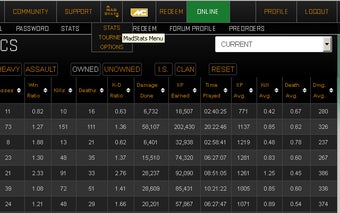
This add-on provides single-click stat column sorting, with descending order as the default. It also adds a convenient MadStats menu icon in the center for easy access to options. On the Weapon stats page, MadStats creates a button bar that allows users to filter by weapon type and clan/is. Similarly, on the Mech stats page, it creates a button bar for filtering by weight class, ownership, and clan/is.
MadStats also offers some additional features to improve usability. For example, it displays custom mech names when the mouse hovers over the first column. It hides duplicate mechs by default, but users can show them again with the click of a button. It also adds a sticky table header to maintain readability when scrolling through large tables.
Furthermore, MadStats allows users to fully zoom in on the tables for easier reading. By holding the Ctrl key and pressing the + key, users can adjust the zoom level. The add-on also introduces sortable time columns, where users can hover over for the original time value display.
For MWOMercs.com users, MadStats automatically updates the owned mech list on the profile page or mech stats page. The table styles in MadStats use tablesorter's built-in theme: Black Ice.
Please note that there is a debug mode available for users to enable. This mode reveals additional features that are still being tested and may have some issues. Users can access the debug mode through the options panel. In debug mode, users can use the column filters and download button, although they require manual enabling.